
No cable. No trench. No technician.
Learn how Mac5G Home Internet gets from a cell site to your living room, what the speeds mean, and how to set the router up in the time it takes to make coffee.
A connection that supports work, play and more

Video calls, cloud apps, the school portal and the printer — Home 100's equal upload speed is what keeps your side of the call sharp.

Upload the reel, back up the photos, run the group chat on Wi-Fi instead of the phone plan's hotspot.

A 4K stream wants about 25 Mbps; Home 200 has room for several at once plus a console. Latency on 5G fixed wireless is fine for most games — a specialist can tell you what your address sees.
Cancel from My Account any time; unopened routers return within 30 days. A bad fit costs a month, not a year.
The technology behind 5G home internet
How it's different from cable
Cable internet rides a coaxial line that has to be trenched, spliced and shared down the street. Mac5G Home Internet runs on the 5G network, over the air. It is the same signal your phone uses, received by a router with real antennas instead of a pocket-sized one — so it reaches houses and shops the cable never got to.
How the router does its job
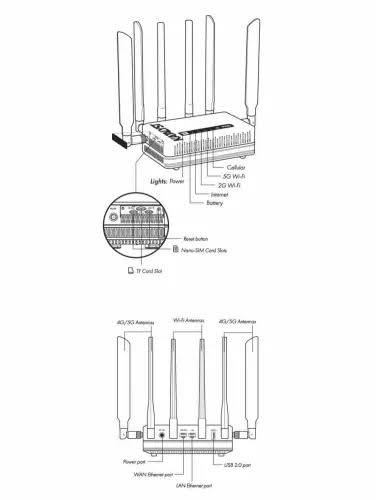
The network is a series of cell sites sending and receiving data by radio. Your Katalyst router locks onto the nearest site, converts the 5G signal into Wi-Fi, and hands it to every device in the house. Set it near a window facing the tower and it does the rest.
Why placement matters
Walls, metal roofs and distance to the site all trim the signal. The router's app shows signal bars; a Beacon window antenna or a Sidekick extender fixes most weak spots without changing plans.
What the speeds mean
Enough for several HD streams, video calls and school at once. The upload matches the download, which cable plans rarely do.
Twice the ceiling for the full house, a home office and gaming at the same time.
For addresses on LTE where the 5G plans don't qualify yet: 300GB a month at a steady 25 Mbps, then reduced speed.
Pooled buckets that run at whatever the network gives where you park. Sized for outages and trips, not for a house of streamers.
Real speeds depend on the address, the signal at the router and network load at that hour. Test what your phone sees today with the speed test and signal test; a specialist can tell you what nearby addresses typically get.
Set it up yourself
Near a window, off the floor, away from the microwave and the metal fridge. The SIM is already in.
Power on. The status light settles once it finds the network — a minute or two.
The network name and password are on the sticker. Change them in the router app if you like.
Two bars or better is good. Fewer? Move it a window over, or add the Beacon antenna. A specialist is a call away.
Dig deeper
The map shows which Mac networks can activate a line where you live.
Coverage mapA one-tap signal test at the spot where the router would sit.
Signal testThe same routers and plans for a storefront, a job site or a fleet.
Business internetDive deeper into Mac5G Home Internet
What is 5G internet?
Broadband delivered over the 5G network instead of a wire. A router in the house — modem and Wi-Fi in one box — receives the signal and shares it. Nationwide network, address-qualified plans, no annual contract, router bought or rented, set up in about fifteen minutes.
How fast is 5G home internet compared to cable?
Home 100 is rated up to 100 Mbps each way and Home 200 up to 200. Cable download speeds can be higher on paper, but cable upload is usually a tenth of the download; 5G fixed wireless gives you the same speed both ways. Speeds vary by address and time of day — the month-to-month terms let you compare for real.
Is it available in rural areas?
That is the point of it. Anywhere the 5G network reaches with a usable signal can qualify, including addresses the cable company never trenched. The address check tells you in seconds; a specialist can check by hand and look at the Essential plans on LTE.
How easy is setup compared to cable?
No technician, no appointment window. Plug the router in near a window, join the Wi-Fi on the sticker, done. A specialist walks you through it by phone if you would rather.
How much does it cost?
From $135.99 a month for Home 100 with autopay and a Mac Wireless phone line ($140.99 with autopay alone), plus the router bought or rented. No annual contract; internet access is not subject to Mississippi sales tax.
Which router should I get?
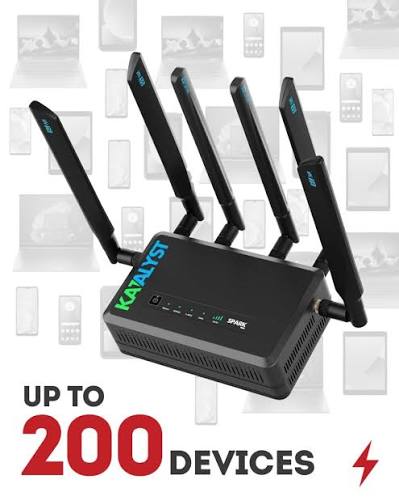
The Kadet ($469.00) for a fixed spot with up to 200 devices; the Spark ($499.00) when you want the 8-hour battery and dual-SIM failover, or plan to travel with it. Rent an eligible router for $14.99 a month if you would rather not buy.
Compare our plans
Bundle with a Mac Wireless phone line and save $5.00 a month on the internet — on top of the $5.00 autopay discount.
| Plan | Home 200 | Home 100 | Essential 300 | Backup 30 |
|---|---|---|---|---|
| With autopay + phone line | $198.99/mo | $135.99/mo | $135.99/mo | $114.99/mo |
| With autopay | $203.99/mo | $140.99/mo | $140.99/mo | $119.99/mo |
| List price | $208.99/mo | $145.99/mo | $145.99/mo | $124.99/mo |
| Data | Unlimited — no cap | Unlimited — no cap | 300GB a month | 30GB a month |
| Speed | up to 200 / 200 Mbps | up to 100 / 100 Mbps | up to 25 / 25 Mbps | network speed |
| Network | Mac5G 5G network | Mac5G 5G network | Mac5G network | Mac5G network |
| Router | Spark (dual-SIM failover) · buy or rent | Kadet · buy or rent | Kadet · buy or rent | Spark (dual-SIM failover) · buy or rent |
| Annual contract | None | None | None | None |
| Suspend between seasons | — | — | — | Yes |
| Best for | The whole house | The whole house | LTE-only addresses | Outages · RV · seasonal |
Talk to us
Monday – Friday, 8 a.m. – 6 p.m. Central. Sales and support on the same number — the person who qualifies the address is the one who answers when the light blinks.